
The K-12 Threat Landscape
Live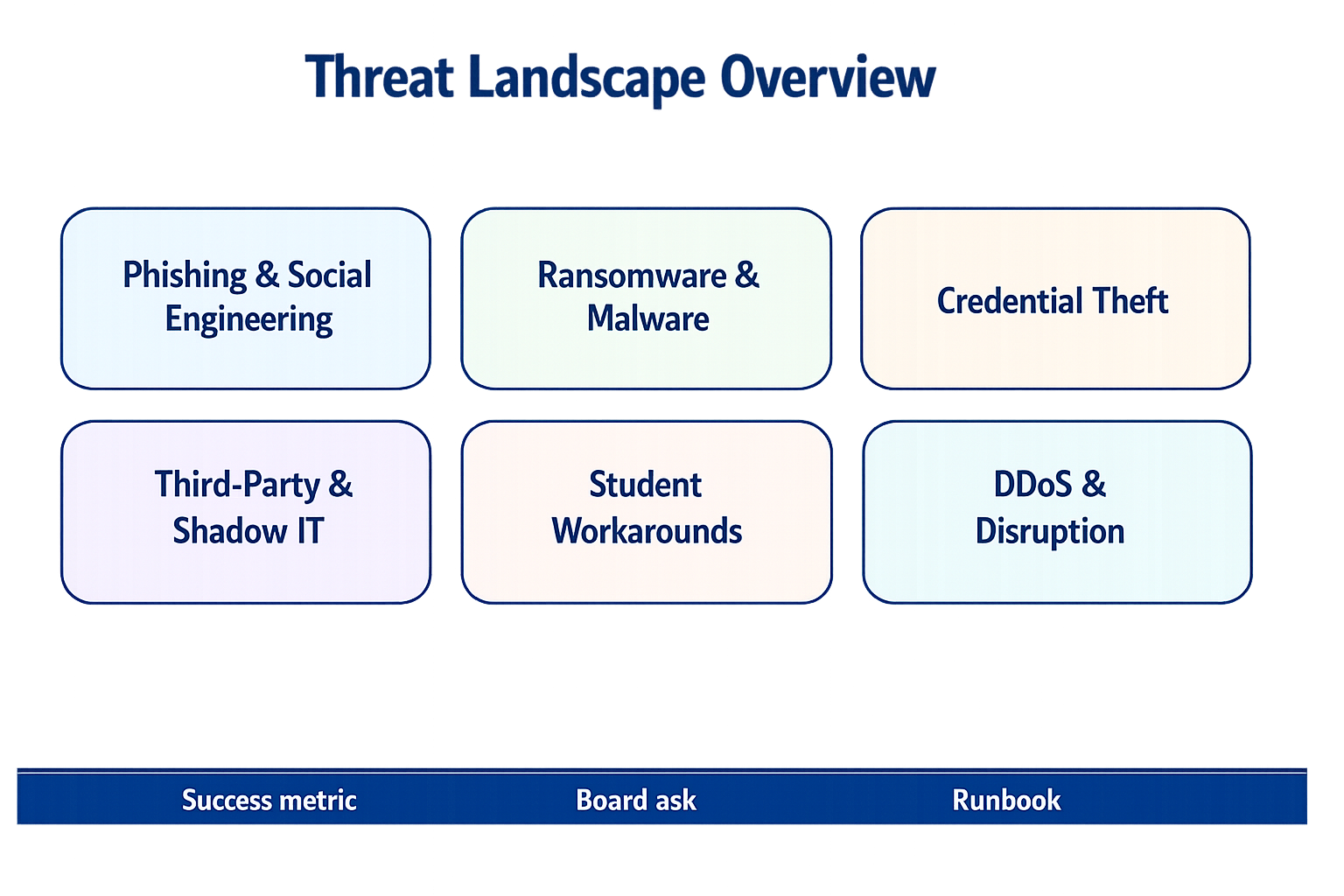
Recognize external attacks, internal experimentation, and third-party exposure without losing the learning mission.
Applied practice: Spot the K-12 Phish
Distinguish legitimate district messages from phishing attempts involving payroll, grades, and student records.
Topics in this Lesson
Chapter 2: The K-12 Threat Landscape
K-12 schools face a unique and evolving threat landscape that combines external cyberattacks with internal challenges from students and staff. Unlike corporate environments where threats are primarily external, educational institutions must contend with sophisticated external attackers, creative students testing security boundaries, and well-intentioned staff who may inadvertently create vulnerabilities.
The feedback from K-12 districts across the country reveals a consistent pattern: phishing remains the dominant threat, but the landscape is becoming more complex and challenging to manage. Caroline Lightfoot, Director of Technology at Dickinson ISD, describes their primary threat: “Phishing is by far the most common and persistent challenge that has impacted our district. It’s a tricky one to handle because it relies so heavily on human behavior.”
Framework visual: Threat Landscape Overview slide
Figure: Six-key threat overview with exec bar for metric/board/runbook discussion.
Rubric Checkpoint
NIST CSF Function: IDENTIFY
Rubric Domain: Risk Assessment
NIST CSF 2.0 Categories:
| Category | Code | Outcome |
|---|---|---|
| Risk Assessment | ID.RA | Threats to district assets and operations identified and documented |
| Improvement | ID.IM | Threat intelligence informs security improvements |
Understanding your threat landscape is the foundation of risk assessment. The Rubric evaluates how well you identify, document, and prioritize the threats specific to K-12 environments.
Key Maturity Indicators:
- Level 2: Basic threat awareness exists among IT staff
- Level 3: Documented threat profile for your district
- Level 4: Regular threat assessment updates with metrics
- Level 5: Threat intelligence integration and proactive analysis
Assessment Tip: The Rubric asks whether you can identify your top 5 threats. This chapter helps you answer that question.
The Three Threat Categories
Framework visual: Three Security Categories
K-12 districts face threats from three distinct categories:
External Attacks:
- Phishing and smishing
- Ransomware
- Business email compromise
- Credential theft
Internal Risks:
- Student mischief and boundary testing
- Staff errors and workarounds
- Unauthorized device introduction
Regulatory Requirements:
- FERPA compliance
- COPPA compliance
- CIPA compliance
- State-specific regulations
Each category requires different defensive approaches, and the most effective security programs address all three simultaneously.
The Phishing Epidemic
Framework visual: Why Phishing Works
The Human Element Challenge
Phishing attacks in K-12 environments present unique challenges because they target the human element in an environment where human interaction is central to the mission. Teachers and staff are focused on education, not cybersecurity, making them prime targets for sophisticated social engineering.
Dickinson ISD provides annual cybersecurity training to all staff, which includes a strong focus on recognizing phishing attempts. Lightfoot observes the challenge: “This training has definitely raised awareness, but it sometimes swings in two extreme directions.”
The first extreme is over-paranoia. “We occasionally see teachers become so wary that they don’t trust any email, even legitimate and critical communications that come from trusted sources like TEA (Texas Education Agency), our state education agency. While their caution is understandable, it can lead to delays in receiving important information or completing necessary tasks because they’re hesitant to click on anything.”
The second extreme is unintentional exposure. “We still frequently encounter situations where staff, in an effort to ‘do the right thing,’ will forward a suspicious email directly to the IT staff for verification. While we appreciate their intent to report it, this action actually exposes the entire district to the threat contained within that email.”
Evolving Phishing Tactics
The sophistication of phishing attacks continues to increase. Mark Parsons, Director of Technology at Inter-Lakes School District, reports on evolving threats: “I have seen an increase in phishing for sure, and they are getting better. Business email compromise is the most frequent threat.”
Florida Union Free School District Technology Director Dana Castine notes the rise of smishing attacks: “While phishing attacks focus on email, smishing attacks focus on fraudulent text messages. Two years ago my department developed a Cybersecurity Poster that includes a reporting feature and a contact number to call during non-operating hours.”
Castine describes a typical smishing scenario: “On several occasions, a cluster of staff members have received text messages from the ‘superintendent’ or ‘board of education president.’ These messages typically build trust first in asking the recipient how they are and if they have time to do the alleged sender a favor. Eventually, the request for some type of monetary exchange occurs.”
Response Strategies
Effective phishing response requires a multi-faceted approach. Dickinson ISD focuses on continuous education, technical controls, rapid response, and proactive alerts. “When a phishing email is reported, our team quickly analyzes it and, if confirmed malicious, works to remove it from all inboxes across the district and block the sender,” says Lightfoot.
The key is finding the right balance between awareness and overreaction while ensuring staff know the safest way to report suspicious activity. “It’s a constant battle, and the human element of phishing means we have to keep adapting our training and communication strategies,” Lightfoot explains.
Student-Generated Threats
Framework visual: Student Generated Threats
The Creativity Challenge
Students in K-12 environments are increasingly sophisticated in their attempts to circumvent security controls. “Kids are really smart, and network technologists need to stay ahead of them,” says Dan Klimke of NetAlly, which helps schools understand and address performance and risks in their networks. This creativity presents unique challenges for cybersecurity teams.
At a large Massachusetts district, students found a way around IPsec port blocking by initiating hotspots on their phones and switching tunnels to open ports. The network team detected large amounts of tunneled bandwidth being consumed, with staff complaining about inappropriate web browsing. Students had blocked IPsec ports (4500, 500) on the firewall, but some students got around it by initiating a hotspot on their iPhones, then dropping the tunnel on the phone with tunnel switching to an open port (17393).
Framework visual: Tunneling Attack
“CyberScope caught the issue. Problem solved, access restricted again,” Klimke reports. This type of real-time detection and response is crucial when students will continuously test security boundaries.
DDoS Attacks from Within
Student-initiated attacks can also target the broader network infrastructure. Florida Union Free School District experienced a DDoS attack initiated by a local high school student that impacted all school districts in the county connected to the local consortium’s network fiber ring.
“During that time we followed the district’s developed disaster recovery protocols and transitioned to network outage mode,” says Castine. “Communication is key in these situations: internally, within the community (website emergency posting), and receiving updates from the local consortium. We also have hotspots and mobile devices in all major office areas for internet connectivity.”
Unauthorized Device Introduction
Students and staff sometimes introduce unauthorized devices that can create security vulnerabilities. The Massachusetts district discovered an instructor who had brought in her own router to solve a Wi-Fi coverage issue, hoping to use it as a repeater but causing network problems instead.
“Unauthorized Wi-Fi devices are a constant battle,” the network manager notes. “CyberScope has already saved us twice. We had a problem last year that took us a long time to find. I think CyberScope would have solved it fast.”
Voices from the Field
Caroline Lightfoot, Director of Technology, Dickinson ISD
“Phishing dominates our threat landscape. It’s by far the most common and persistent challenge that has impacted our district. It’s a tricky one to handle because it relies so heavily on human behavior. We provide annual cybersecurity training to all staff, which includes a strong focus on recognizing phishing attempts. This training has definitely raised awareness, but it sometimes swings in two extreme directions.”
Dana Castine, Technology Director, Florida Union Free School District
“Phishing and smishing represent our biggest threats. Definitely phishing and smishing are most prominent. While phishing attacks focus on email, smishing attacks focus on fraudulent text messages. Two years ago my department developed a Cybersecurity Poster that includes a reporting feature and a contact number to call during non-operating hours.”
Castine describes a typical smishing scenario: “On several occasions, a cluster of staff members have received text messages from the ‘superintendent’ or ‘board of education president.’ These messages typically build trust first in asking the recipient how they are and if they have time to do the alleged sender a favor. Eventually, the request for some type of monetary exchange occurs.”
The district also faces student-generated threats: “We had a local HS student initiate several DDoS attacks that impacted all of the school districts in the county connected to the local consortium’s network fiber ring.”
Mark Parsons, Director of Technology, Inter-Lakes School District
“I have seen an increase in phishing for sure, and they are getting better. Business email compromise is the most frequent threat.”
Technical Detection and Response
Framework visual: Detection and Response
Edge Network Visibility
The student-generated threat landscape requires comprehensive visibility into network activity, particularly at the edge where students are most likely to attempt security bypasses. Traditional centralized monitoring tools may miss activity that occurs at the network perimeter.
Edge network visibility tools can provide real-time detection of unauthorized devices, unusual traffic patterns, and security bypass attempts. These tools can discover all Ethernet, Wi-Fi, and Bluetooth devices on the network, identify their locations, and determine if they are authorized or potential threats.
The Massachusetts district uses this approach to quickly identify and resolve network issues. “The network technician can walk a building or the parking lot and quickly characterize what is going on and if there are issues, then find them fast,” says Klimke. This capability is crucial when students are constantly testing security boundaries.
Network Segmentation as Defense
Effective network segmentation can help contain threats when they do occur. Dickinson ISD has implemented network segmentation that separates students, staff, administration, and BYOD networks. “If a student device on the student network gets compromised, the malware is largely contained within that segment,” says Lightfoot.
This approach provides security while maintaining the flexibility that learning environments require. Students can access educational resources without compromising administrative systems, and teachers can use their devices without exposing student data to unnecessary risks.
Real-Time Monitoring and Response
The dynamic nature of K-12 threats requires real-time monitoring and rapid response capabilities. When threats are detected, cybersecurity teams need to be able to respond quickly to contain and mitigate the impact.
This might involve automated threat detection and response systems, real-time alerting for suspicious activity, and rapid incident response procedures. The key is having the right tools and processes in place to detect threats quickly and respond effectively.
Practical Threat Management Strategies
Comprehensive Training Programs
Effective threat management starts with comprehensive training programs that address the specific challenges of K-12 environments. This includes:
- Phishing awareness training that teaches staff to recognize and report suspicious emails safely
- Student education about responsible technology use and the consequences of security bypass attempts
- Regular updates to training programs as threats evolve
Technical Controls
Technical controls should be implemented to detect and prevent threats:
- Email filtering systems to catch phishing attempts before they reach users
- Network monitoring tools to detect unusual traffic patterns and unauthorized devices
- Access controls to limit what students and staff can access based on their roles
Incident Response Planning
Every district should have a comprehensive incident response plan that addresses the specific threats they face:
- Communication procedures for notifying staff, students, and parents about security incidents
- Containment strategies for limiting the spread of threats
- Recovery procedures for restoring normal operations after an incident
- Continuous Monitoring and Adaptation
The threat landscape is constantly evolving, so districts need to continuously monitor for new threats and adapt their security strategies accordingly. This includes:
- Regular threat assessments to identify new vulnerabilities and attack vectors
- Security tool updates to ensure they can detect and respond to new threats
- Policy reviews to ensure security policies remain effective as threats evolve
The Path Forward
The K-12 threat landscape will continue to evolve, with attackers becoming more sophisticated and students becoming more creative in their attempts to circumvent security controls. Districts that succeed in managing these threats are those that:
- Understand the unique nature of K-12 cybersecurity challenges
- Implement comprehensive training programs that address both external and internal threats
- Deploy appropriate technical controls that can detect and respond to threats in real-time
- Maintain flexible security policies that can adapt to changing threats and educational needs
- Foster a culture of security awareness among all stakeholders
The key is finding the right balance between security and accessibility, recognizing that K-12 environments have unique requirements that don’t exist in other sectors. By understanding the threat landscape and implementing appropriate countermeasures, districts can protect their students, staff, and data while maintaining the flexibility and accessibility that modern education requires.
As threats continue to evolve, so too must the strategies for managing them. The districts that succeed will be those that can adapt quickly to new threats while maintaining their focus on their primary mission: educating students.
What Your Boss Should Know
The Bottom Line: K-12 threat detection requires meaningful IT budget investment but prevents costly incidents while protecting district reputation.
Board Decisions Required:
- Allocate budget for edge network visibility and threat detection tools
- Fund comprehensive cybersecurity training for all staff, not just IT
- Establish incident communication protocols for multi-stakeholder events
What Success Looks Like:
- Low phishing click-through rates (target: under 5%)
- Substantially fewer security incidents with faster response times
- Staff confident in reporting suspicious activity
Why It’s Worth It: One major incident costs more than years of threat detection investment.